Let AI use your browser, safely.
BrowserBridge puts AI to work in your real browser, in your real session. It can search, click, compare, and fill out the form. You approve the submission.
“Find the earliest appointment within 25 miles and fill the form, but stop before submitting.”
Available appointments
Northside Clinic · 4.1 mi
Tue 9:40 AM
Lakeview Health · 7.8 mi
Mon 8:15 AM · earliest
Best matchCentral Care · 12.3 mi
Wed 2:00 PM
Booking form
Full name
Phone
Preferred time
12:04:17 Approved by you · form submitted · recorded in audit trail
ACT · approval request
Submit appointment form at clinics.example?
Medium risk · this form only · expires in 5 min
The real product
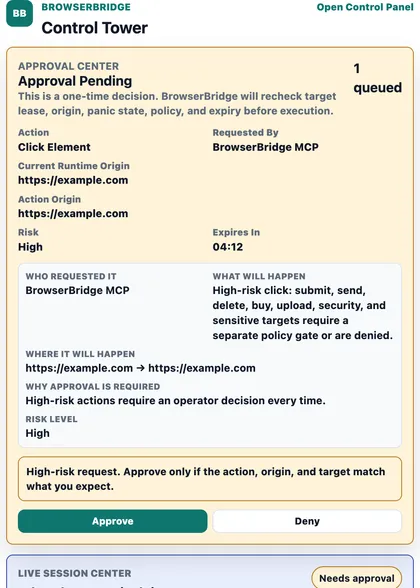
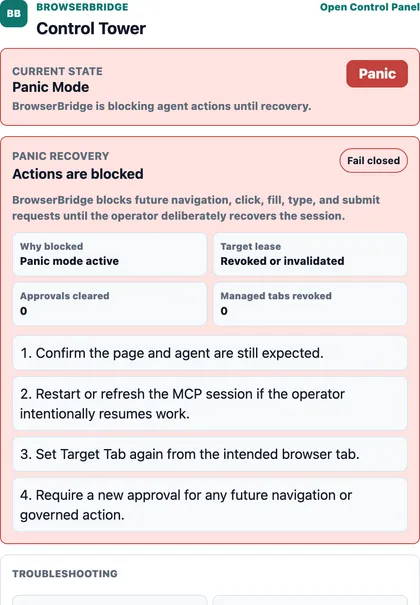
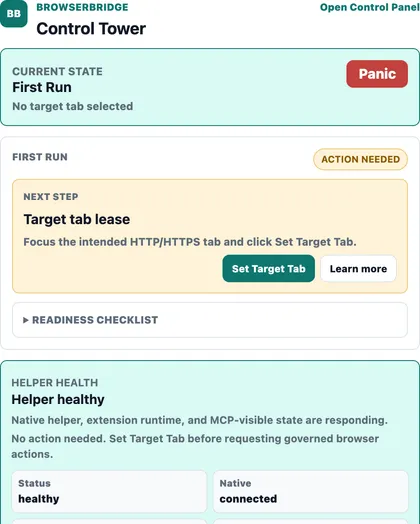
The Control Tower popup, up close.
Three of the extension's actual screens: a high-risk approval, panic mode, and first-run setup.
How it feels
Hand AI the annoying website task.
A Chrome extension plus a local companion. The agent works in the browser you already use. No handing over passwords, no shipping your session to a bot farm in the cloud.
The agent opens the site and works through it like you would
It searches, compares options, and fills the safe fields
Anything big, like submit, purchase, or delete, pauses
You approve from your phoneACT approval
The task finishes, and the whole run is recorded
Where it shines
Made for the web's busywork.
- Booking and scheduling
- Research and comparison
- Data entry
- Forms and applications
- Account workflows
- Admin panels
- Internal tools
- Repetitive web tasks
Sensitive actions need a signed, single-use approval. A big step can't run without a clearance you issued, and a panic button revokes in-flight authority where supported.
AI can fill the form. You approve the submission.
AgenticSuite on GitHub